Otamigo e-vouchers FAQs
Otamigo Reservations Team - mobile/Viber: +639171846897 / email: sales@otamigo.com
What are Otamigo e-vouchers?
Otamigo e-vouchers are available in denominations of P500, P1000, and P2000. When applied, the corresponding e-voucher amount instantly deducts its value from the total hotel reservation or accommodation during checkout in the Pluxee Booking Portal (https://otamigo.com/pluxee/).
What is the Pluxee Booking Portal?
Otamigo is the first-ever Filipino Travel Solutions provider which is intended to fully help Corporate (B2B) users search for travel services, making reservations and managing accommodation needs at 600,000 plus properties globally using various payment options.
The Pluxee Booking Portal (https://otamigo.com/pluxee/) is the co-branded website specially made for Pluxee users that would like to redeem their Otamigo e-vouchers for booking hotel reservations.
How to use Otamigo e-vouchers in the Pluxee Booking Portal?
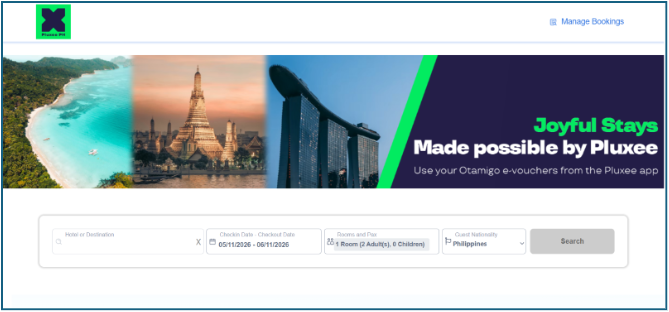
Search for your preferred hotel or destination including the following details:
Check in and check out dates
Number of rooms and guests (Pax)
Guest Nationality
Click ‘Search’
Browse the available hotel options, choose your preferred hotel and click ‘Book’
Book your room type and room plan, then complete all required booking details such as Guest information, Contact details, and Special requests (if applicable)
Scroll down to ‘Cash Voucher / Promo Code’ and enter the Otamigo e-voucher purchased from the Store of the Pluxee app.
Once successful, voucher and deducted value will appear under ‘Price Summary’ with the updated total booking cost.
Pay using any of the accepted payment methods: Visa, Mastercard, American Express (Amex), Maya, GrabPay, QRPH (Gcash)
Notes:
Only one (1) Otamigo e-voucher code may be applied per transaction. Multiple e-voucher codes cannot be combined in a single booking.
Otamigo e-voucher format should contain the “PLX” prefix and contains dashes (-)
If the e-voucher code format is incorrect, an “Invalid Promo Code” message will appear.
How will I know that my booking is confirmed?
After your payment has been completed, a confirmation page will appear with a “Hotel Voucher” downloadable through the provided booking link. The confirmation email will also be sent to your email address with the Hotel Voucher booking link.
For bookings that require online payment, complete the payment process and check that the system confirms the reservation. Keep the confirmation email and Hotel Voucher for reference.
What is a “Hotel Voucher”?
For completed bookings, the Hotel Voucher is sent to your email address. This can be presented during check-in at the hotel you booked. It contains the following details:
Booking Reference Number
Booking Status
Hotel Details (name, address, contact number)
Hotel/Supplier Reference
Guest/Group details
Booking details (No. of Rooms, Room Type/Name, Stay dates, etc.)
Special Requests
Rate Inclusions/Hotel Remarks
Can I modify my hotel reservation after booking?
Changes depend on the hotel's conditions, room availability, and the applicable booking policy. Contact Otamigo directly through mobile/Viber +639171846897, or email (sales@otamigo.com) before making alternative arrangements. Additional charges may apply.
What can I do if the details in the Hotel Voucher are incorrect?
Contact Otamigo directly through mobile/Viber +639171846897, or email (sales@otamigo.com) as soon as possible. Provide your booking reference number and identify the incorrect information so the team can advise whether a correction is possible.
Never send your password, complete credit card number, or card security code by email.
What should I do if my payment is successful, but I haven't received a booking confirmation?
Check your registered email's inbox, spam, and junk folders. If the confirmation is still missing, contact Otamigo directly through mobile/Viber +639171846897, or email (sales@otamigo.com) and provide your booking reference number, payment details, and registered email address. Avoid making another payment until the transaction has been checked.
Never send your password, complete credit card number, or card security code by email.
Can I use multiple Otamigo e-vouchers in one booking/transaction?
No, you can only use one (1) Otamigo e-voucher code per booking/transaction.
Can Otamigo e-vouchers be redeemed more than once?
No. The Otamigo e-voucher code is one-time use only.
Can I use my Otamigo e-voucher in the main Otamigo Online Booking Portal?
No. Otamigo e-voucher codes purchased from the Store of the Pluxee app can only be used through the Pluxee Booking Portal (https://otamigo.com/pluxee/)
If you visited the main Otamigo Online Booking Portal (https://otamigo.com/), you may click on the yellow ‘Book here’ button located under the search widget to be redirected to the Pluxee Booking Portal (https://otamigo.com/pluxee/)
How can I manage my hotel booking?
Visit the Pluxee Booking Portal (https://otamigo.com/pluxee/) and select ‘Manage Bookings’ located at the upper right corner of the homepage.
Enter your Booking Reference Number and Email Address
Click ‘Search’
Notes:
Here you can check the current status of your booking
If the booking is eligible for cancellation, the ‘Cancel Booking’ button will be available
Important: Cancellation eligibility and refund terms vary depending on the room type and hotel policy. Always review the cancellation policy carefully before completing your booking.
How can I cancel my booking?
Click on ‘Manage Bookings’ in the Pluxee Booking Portal homepage
If the booking is eligible for cancellation, you may click on the ‘Cancel Booking’ button then a pop-up will appear
Review the booking details and cancellation items. If you wish to proceed, click ‘Cancel Booking’
A cancellation message will appear once it is successful. Closing the cancellation message will return you to the booking details page where the current status will be updated to ‘Cancelled’
The payment status will be updated from ‘Paid’ to ‘Full Refund’ or the applicable refund amount, subject to the hotel’s cancellation policy.
Notes:
A confirmation email will be sent to your email address once the cancellation has been processed.
The Otamigo Reservations Team will initiate the refund the same day or the next working day.
You may coordinate directly with Otamigo’s Reservation Team for further assistance especially for non-refundable bookings.
Can I get a refund for a cancelled booking?
Refund eligibility depends on the cancellation policy attached to your room type or reservation. Some bookings may be refundable, while others may be non-refundable. Any eligible refund is subject to the applicable terms and processing procedures.
Can I cancel a non-refundable booking?
You may submit a request, but cancellation does not necessarily entitle you to a refund. Any exception is subject to the hotel's terms and approval.
Why is my Otamigo e-voucher not working?
You may refer or report an issue to Otamigo directly through mobile/Viber +639171846897, or email (sales@otamigo.com)
Was this article helpful?
That’s Great!
Thank you for your feedback
Sorry! We couldn't be helpful
Thank you for your feedback
Feedback sent
We appreciate your effort and will try to fix the article