foodpanda e-vouchers FAQs
What are foodpanda e-vouchers?
foodpanda e-vouchers are one-time use digital promo codes or discount coupons that give you price cuts when you order food, groceries, or household items through the foodpanda app via Restaurant or Shops.
How to redeem e-vouchers?
Open the foodpanda app
Input your location
Choose from the available Restaurants / Shops in your location for Delivery / Pick-up
Place your order/s at the selected Restaurant / Shop then tap ‘View Your Cart’
Tap ‘Apply Voucher’ and paste/input the e-voucher code redeemed from the Pluxee app


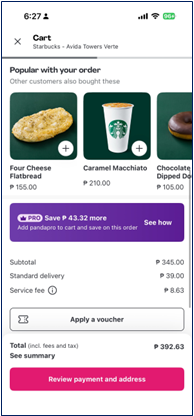
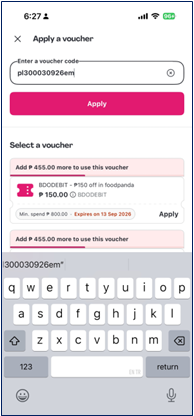
Tap ‘Apply’ and you will be redirected to your cart.

Tap ‘Review Payment and Address’ to review your order and payment details. If the total purchase goes beyond the e-voucher amount, you may pay the remaining amount with other payment modes available in the foodpanda app.
Confirm the details then tap ‘Place Order’ to proceed with your purchase
NOTE: If you apply a voucher but do not finalize the order, the voucher will not remain stored in your account
Can foodpanda e-vouchers from the Pluxee app be used in other countries?
No, it can only be redeemed for Restaurant or Shop orders in the Philippines.
Can my foodpanda e-voucher be redeemed more than once?
No, foodpanda e-voucher is only applicable for a single transaction, one-time use only, redeemed at no minimum spend, and does not apply to surcharges and platform fees.
Can I store my foodpanda e-voucher for a later transaction?
Yes, you may redeem your foodpanda e-voucher through the ‘Vouchers’ menu under the ‘Account’ tab to store them for later.
Can foodpanda e-vouchers be used with other promos or in-app vouchers?
foodpanda e-vouchers cannot be used in conjunction with other offers, promotions or discounts.
What can I do if my foodpanda e-voucher is not working?
For any questions or clarifications, you may contact Pluxee’s Customer Care team at support@care.pluxee.ph
Was this article helpful?
That’s Great!
Thank you for your feedback
Sorry! We couldn't be helpful
Thank you for your feedback
Feedback sent
We appreciate your effort and will try to fix the article